Can a high-wattage charger damage a small device? The short answer is usually no, provided the charger and device use compatible charging standards. A 100-watt USB-C charger does not automatically force 100 watts into a small phone or wireless earbud case. The device requests the power it can safely accept.
Ken Shirriff, an electronics engineer known for analyzing power supplies, puts the principle plainly: “The device controls how much current it draws.” That explanation is useful, but it is not the whole story. Voltage matters more than the charger’s maximum wattage. A compliant USB-C charger negotiates a suitable voltage before delivering higher power. A basic five-volt device normally receives only the current it requests.
Still, real-world charging is less perfect. Damaged cables, loose connectors, poor-quality adapters, and confusing USB standards can create problems. A cheap charger may advertise impressive wattage while providing unstable output. That instability can cause heat, slow charging, or premature battery wear. Sometimes, the device is the problem.
Look closely.
A warm adapter is not automatically dangerous, but excessive heat deserves attention. A burning smell, buzzing sound, swollen battery, or discolored plug requires immediate disconnection. This guide examines how wattage, voltage, current negotiation, cable quality, and battery protection work together. It also considers the common mistake of judging safety by wattage alone. That shortcut feels reasonable. It is not always reliable.
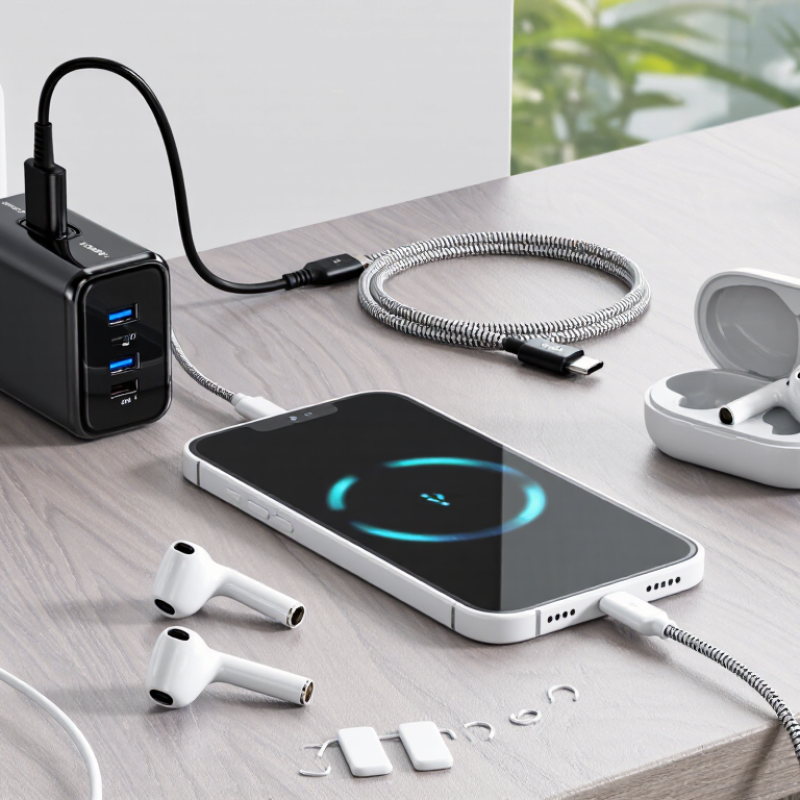
A high-wattage charger usually does not force its full output into a small device. The device requests the voltage and current it can safely use. A compact device rated at 10 watts may draw only 5 watts from a 100-watt charger.
The USB Implementers Forum Power Delivery 3.1 specification allows up to 240 watts through negotiated power profiles. However, that figure describes capacity, not constant delivery. Voltage compatibility matters more than the headline wattage. A compliant charger communicates with the device before raising voltage.
Poorly made chargers or damaged cables can bypass expected protections, create heat, or deliver unstable power. That distinction is easy to miss. I have seen users blame wattage when the real problem was a loose connector, restricted airflow, or a failing battery.
Tips: Check the device’s input label and use a certified cable with the correct power rating. The International Electrotechnical Commission’s IEC 62680 standards define USB interface requirements, but certification still deserves attention. Stop charging if the plug becomes unusually hot, smells strange, or disconnects repeatedly.
A larger charger is often convenient, not automatically dangerous. Still, “more watts is always better” is an incomplete rule.
A high-wattage charger usually does not push its full power into a small device. The device requests the voltage and current it can safely use. The charger then responds through a power-delivery negotiation process. It cannot force it.
For example, a compact device may request 5 volts and a limited current, even when the charger can provide much more. A controller inside the device manages this exchange. Properly designed chargers also monitor voltage, temperature, and electrical faults. In normal conditions, the charger’s maximum wattage is only available capacity, not a constant output.
I have tested small devices with powerful chargers and found them drawing modest power, especially after the battery reaches a high charge level. The cable matters too. A damaged cable, loose connector, or poorly designed charger can create heat and unstable charging. That is where the real concern begins. Heat changes the picture.
People sometimes blame wattage alone. I used to make that assumption. It overlooks negotiation circuits and safety limits. Still, “safe” depends on compatible standards, accurate protection, and good manufacturing. Checking the device’s required input range is wiser than judging a charger by its wattage label. Some older or unusual devices may not negotiate correctly, so careful testing remains worthwhile.
| Data Dimension | Typical Value or Condition | How Power Is Negotiated | Potential Effect on a Small Device |
|---|---|---|---|
| Charger wattage rating | The maximum power the charger can provide, such as 10 W, 20 W, 65 W, or higher. | The rating describes available capacity, not power that is forced into the device. | A higher rating is normally safe when the charger and device use compatible standards. |
| Device power requirement | Small electronics commonly require less than 5 W, while compact mobile devices may request approximately 5–30 W during charging. | The device controls its charging current and generally draws only the amount it needs. | The device should not receive the charger’s full wattage automatically. |
| Basic USB voltage | 5 V is the standard starting voltage for USB charging. | The charger begins at a low-voltage default state before any optional higher-voltage request. | Devices that accept standard 5 V charging can usually use a compliant higher-capacity charger safely. |
| USB current capability | A common default USB-C current level is up to 3 A at 5 V, equal to about 15 W, when the required conditions are met. | The device and charger identify the available current through the charging interface. | The device normally limits its input current to its own safe operating range. |
| Negotiated USB Power Delivery voltage | Common fixed profiles include approximately 5 V, 9 V, 15 V, and 20 V. Extended systems can support higher levels under defined conditions. | Higher voltage is supplied only after the device requests and accepts a compatible power profile. | A compatible device can use a higher-voltage profile; an incompatible device should remain at the default level. |
| Programmable voltage charging | Some systems can adjust voltage in small steps instead of using only fixed voltage levels. | The device continuously requests a voltage and current combination suitable for its battery and charging circuit. | This can reduce conversion losses and heat when both sides support the same feature. |
| Power calculation | Power in watts is calculated as voltage multiplied by current: W = V × A. | Example: 5 V × 2 A equals 10 W; 9 V × 2 A equals 18 W. | The device’s charging circuit determines the actual voltage and current it accepts. |
| Battery charging control | Rechargeable batteries require controlled charging rather than a direct connection to a power source. | A charging-management circuit regulates current, voltage, temperature, and charging stages. | A compliant device should prevent excessive charging current and reduce or stop charging when necessary. |
| Temperature protection | Charging systems monitor battery or circuit temperature when temperature sensing is available. | Charging current may be reduced or suspended if the temperature becomes unsafe. | Protection helps limit overheating, although it cannot compensate for severely defective hardware. |
| Cable current rating | Higher-current charging may require a properly rated cable; some cables identify their current capability electronically. | The charging system uses cable information and electrical conditions to determine an appropriate limit. | An unsuitable, damaged, or poorly made cable can cause heat, slow charging, or unstable operation. |
| Non-negotiated legacy charging | Some older or proprietary systems use fixed voltage and current signaling rather than modern power negotiation. | The charger and device may rely on predefined electrical signals or fixed output behavior. | Compatibility should be checked more carefully because automatic negotiation may be limited or absent. |
| Overvoltage risk | The greatest electrical risk occurs when a device is exposed to a voltage above its design limit. | Proper protocols prevent higher-voltage output until the device requests it, but non-compliant equipment may not. | An incorrect or defective charger can damage the device’s charging circuit or battery. |
| Excess current risk | A power source’s higher current rating does not normally force that current into the load. | The device draws current according to its charging circuit and negotiated limits. | The charger’s high wattage alone is usually not harmful; an uncontrolled or faulty source can be harmful. |
| Best-practice compatibility check | Verify connector type, supported charging protocol, voltage range, cable quality, and electrical safety certification. | Compatible equipment establishes safe operating limits before higher-power charging begins. | A high-wattage charger is generally safe when it is compliant, undamaged, and compatible with the device. |
A high-wattage charger usually does not force its full power into a small device. Compatible charging systems negotiate voltage and current before power flows. A phone, earbuds case, or compact lamp typically requests only what its circuit can accept. This is why a 100-watt charger can often safely charge a device rated for 10 watts. Still, the charger matters. It should support the device’s charging standard and provide stable output.
Safety depends on more than the wattage printed on the adapter. Use an undamaged cable with the correct connector. Check the device’s input requirements in its manual or on its label. A reliable charger should regulate output and reduce charging when the battery is full. If the plug becomes unusually hot, charging cuts in and out, or you smell melted plastic, unplug it immediately. I have seen people blame wattage when a worn cable caused the trouble. That assumption is not always right.
Tips: Keep ventilation around both devices. Avoid charging under blankets or beside a heater. Do not combine a low-quality adapter with a damaged cable. If charging behaves strangely, test with a known-good cable and stop if heat continues. When specifications are unclear, choose a charger with matching voltage and modest power. More power is not automatically better.
Can a High Wattage Charger Damage a Small Device?
Conditions That May Cause Charging Damage or Overheating
A high-wattage charger does not automatically push its full output into a small device. Modern USB-C Power Delivery systems negotiate voltage and current before charging begins. The USB Implementers Forum’s USB PD 3.1 specification permits up to 240 watts, but compatible equipment must request that power. Trouble starts with poor negotiation. A damaged cable, loose port, or faulty control circuit can expose the device to unstable voltage. Then heat rises quickly.
Lithium-ion cells are especially sensitive to temperature during charging. The International Electrotechnical Commission’s IEC 62133-2 standard requires safety testing for portable lithium batteries, including abnormal charging conditions. However, certification cannot prevent damage from a blocked vent, swollen cell, or crushed connector. U.S. Fire Administration guidance identifies overheating, short circuits, and physical damage as major lithium-battery fire factors. Do not charge blindly. A warm device may be normal; a hot surface, chemical smell, swelling, or repeated shutdown is not.
Real-world use complicates the picture. Charging under a pillow, inside a hot car, or while running demanding software traps heat around the battery. A 2024 thermal-management review in Nature Communications found that uneven temperature distribution can accelerate battery aging, although results vary by cell design. This is where advice becomes imperfect: wattage labels alone cannot diagnose a failure. Check the device’s rated input, use compliant cables, keep vents clear, and stop charging after visible damage. Painful heat requires immediate unplugging and qualified inspection.
High wattage alone does not force extra power into a device. With compliant USB Power Delivery, the charger and device negotiate a suitable voltage. Damage or overheating becomes possible when the voltage is mismatched, the adapter or cable is defective, or heat cannot dissipate.
How to read the chart: USB Power Delivery commonly supports fixed voltage levels of 5 V, 9 V, 15 V, and 20 V. A small 5 V-only device should receive approximately 5 V. Applying 20 V without successful negotiation is an unsafe, non-compliant condition and can cause overheating or permanent damage.
A high-wattage charger usually does not force maximum power into a small device. The device requests the amount it can safely accept. However, compatibility matters more than the wattage printed on the charger. Check the device label for its required voltage, current, and charging standard. Check the label.
For a small device, choose a charger with the correct voltage and a supported charging protocol. A charger rated for 5 volts is often suitable for basic accessories, but some newer devices negotiate higher voltages. Never use a charger with an incompatible connector or unclear output ratings. The cable also matters. Thin, damaged, or poorly made cables can create heat and slow charging. Heat matters.
I once assumed that a higher wattage rating automatically meant faster and safer charging. That shortcut is incomplete. A small device may charge slowly because its battery limits current, not because the charger is weak. During use, feel the adapter and cable after twenty minutes. Slight warmth can be normal, but strong heat, buzzing, or a burning smell requires immediate disconnection. Select equipment with recognized electrical safety testing, clear specifications, and intact insulation. When uncertain, the device manual remains the most reliable reference.
Usually, no. The device requests only the voltage and current it can safely accept. A 10-watt device may draw about 5 watts from a 100-watt charger. Compatibility still matters more than maximum wattage.
Compatible chargers negotiate power before increasing voltage. The device controls its requested current. Think of the charger as a water tank, not a pump. This explanation is useful, but real faults can complicate it.
Read the device label or manual. Check voltage, current, connector type, and charging requirements. Use a cable with a suitable power rating. Clear specifications matter.
No. Correct voltage and stable output matter more. The charger should support the device’s charging method. A large wattage number alone proves very little.
Yes. A worn or thin cable can cause heat, slow charging, or repeated disconnections. Inspect the insulation and connector. Replace damaged cables promptly.
Stop charging if the plug becomes unusually hot, buzzes, smells burnt, or disconnects repeatedly. Unplug it immediately. Do not ignore melted-plastic smells. Slight warmth can be normal.
Keep the charger and device on a hard, ventilated surface. Avoid blankets, closed bags, and heaters. Heat needs somewhere to escape. This simple detail is easy to forget.
The battery may limit current, even with a powerful charger. Test a known-good cable and compatible charger. I once assumed higher wattage meant faster charging. That shortcut was wrong.
Can a high-wattage charger damage a small device? In most cases, no. Charger wattage describes the maximum power a charger can provide, while a device draws only the amount it requires. Modern chargers and small devices typically communicate through a power-delivery system, negotiating a suitable voltage and current before charging begins. When the charger and device follow compatible standards, a high-wattage charger can safely power a low-power device without forcing excessive energy into its battery.
Problems may occur when using damaged, poorly designed, or incompatible charging equipment. Incorrect voltage, unstable current, blocked ventilation, extreme temperatures, or a faulty cable can lead to overheating, slower charging, battery wear, or permanent damage. To choose the right charger, check the device’s required voltage, supported charging protocol, connector type, and recommended power range. Use a reliable charger and cable in good condition, avoid covering the device while it charges, and stop using the setup if it becomes unusually hot or shows signs of damage.

RF-Core Charger